I’
ve gotten several questions about Google Reader (what it is, how to use it, etc) in response to my
blog candy so I thought I’d give a quick summary.
Google reader (
www.google.com/reader) is a FANTASTIC tool that houses all your blogs you like to surf (or as I like to say,
BLURF!). Gone are the days of having them in your favorites and having to click on them one by one to visit them every day to see if there is a new post. Google Reader takes care of that for you. Much like an email program that highlights “new mail”, Google Reader does the same thing.
To get started, you must have a Google account (but you do not have to have a
Gmail account). If you don’t it’s quite simple to set one up. Once logged in, your home screen will appear. Here’s a copy of mine:
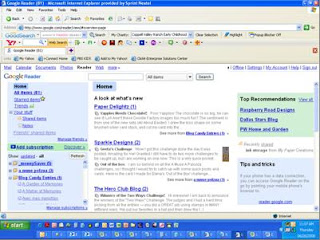
Yours will of course look different because you won’t have any blogs set up yet. Here’s the hard part (and I say that very loosely!) You need to collect all the blog addresses to put in here. That is the most labor intensive part (
i.e. copy/paste function). Look over to the left side bar and in the middle you’ll see a neon green section with a plus sign that says Add Subscription. Just click on it and you’ll see this appear:

All you have to do now, is paste in one of your addresses (or mine for instance – www.mytreasuredcreations.blogspot.com). I chose for this example to add Making Memories blog(http://makingmemories.typepad.com/ ) I typed in the blog address then hit the Add button. This is what came up:

Depending on the blog you may or may not have unread items. If you do, then they’ll appear in the screen where it says “Making Memories” has no unread items.” If you want to view all of the blog entries you can click on View All Items. You’
ve just added your first blog! How easy was that? Just do it as many times as you have blogs.
Now you can also organize your blogs as well by putting them in folders. If you see in the golden color bar where it says “You have subscribed to “Making Memories.” There is a button that says Add to a folder…. You can add it to an existing folder (if you have one), create a new one or leave as is. I like to organize mine on topic. I have photography/
Photo Shop tutorial blogs, Scrapbook, Stamping, Friends, and even company blogs (like Making Memories). I even have a folder for new blogs I found and entered blog candy (so I remember to check back to see if I won!) This makes it much easier for me to locate a blog I want. It also allows me to not have to read ALL my blogs at one time if I don’t want to. I can choose a folder and only scroll through those. If you forget when you add a blog to put it in a folder (or you want to create one later, just click on the Feed Settings tab and go down to the third section where you folders are listed or choose at the bottom New Folder.
A couple notes. When you scroll through a blog, it now marks it as read and when you refresh your reader, it’s gone. SO, if you find something of value, you’ll need to figure a way to remember it. If you want to visit the blog (i.e. to leave comments or blog candy), you can click on the name of the blog entry in your reader window or on the name of the blog at the top and it’ll take you directly to the blog.
I’
ve only scratched the tip of Google Reader and I know there must be more tips out there so how ‘bout YOU all give me some? What features could I be using? Also, was this helpful for you?