Thursday, July 17, 2008

Blog Candy Winner!

Thanks everyone for you patience and the lovely comments! I really appreciate it. So, I had over 80 folks which really suprised me!! Thanks everyone! Without further ado our winner is...

Fiona W
Check out her blog! She has some really beautiful creations!!

Send me your addy so I send out your package. I believe you are as we say, "across the pond" and I am extremely excited to send it off to you!

Now, a few of you have asked about the google doc/spreadsheet. It worked great BUT I would only use it again if I was asking for one entry. Since I had said you could do 1-3 things, it made things a little more time consuming to figure out how many entries each person got then have to add another line item. Additionally, I'd turn comments OFF on the blog so that all folks would know to use the form to submit their entry rather than in the comment form. All in all, I'm really happy with GoogleDocs and will use it again.

Be back this weekend with a few creations!!!
signature

Tuesday, July 15, 2008

We're Home

So sorry to have left ya'll so quickly! We made it home and are trying to adjust again. E's surgery went as well as expected thought didn't expect to stay two weeks nor for her to have two surgeries! Unfortunately, her journey is not yet over. The surgeries performed didn't help so we're now looking for a specialist (anyone know of a pediatric endourologist??).

I'll draw the name in the next day or two. Just need to get unpacked and settled.

Thanks everyone for your well wishes and patience!!!
signature

Thursday, July 3, 2008

Be back soon

Sorry for not drawing blog candy... We had a slight change of plans and had to fly out this past weekend for my daughter and her surgery. I hope to draw the candy in the next day or two. Stay tuned!!!
signature

Sunday, June 29, 2008

Birthday Set

While I love to make "stuff," I really want it to be practical and useful. I love pretty things but if it's just going to end up in the garbage, why bother?

With my sister's birthday coming up, I decided to make a note card set for her. I absolutely LOVE Papertrey Ink's stamps and paper (I WANT MORE!) and decided that this would be perfect for a set of note cards for her.

Cards with matching envies:


I even boxed the up, made a matching pen and added some York Peppermint Patties!

What do you think?

signature

Thursday, June 26, 2008

Google Reader

I’ve gotten several questions about Google Reader (what it is, how to use it, etc) in response to my blog candy so I thought I’d give a quick summary.

Google reader (www.google.com/reader) is a FANTASTIC tool that houses all your blogs you like to surf (or as I like to say, BLURF!). Gone are the days of having them in your favorites and having to click on them one by one to visit them every day to see if there is a new post. Google Reader takes care of that for you. Much like an email program that highlights “new mail”, Google Reader does the same thing.

To get started, you must have a Google account (but you do not have to have a Gmail account). If you don’t it’s quite simple to set one up. Once logged in, your home screen will appear. Here’s a copy of mine:
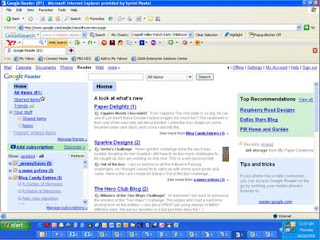
Yours will of course look different because you won’t have any blogs set up yet. Here’s the hard part (and I say that very loosely!) You need to collect all the blog addresses to put in here. That is the most labor intensive part (i.e. copy/paste function). Look over to the left side bar and in the middle you’ll see a neon green section with a plus sign that says Add Subscription. Just click on it and you’ll see this appear:
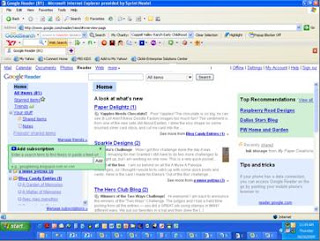
All you have to do now, is paste in one of your addresses (or mine for instance – www.mytreasuredcreations.blogspot.com). I chose for this example to add Making Memories blog(http://makingmemories.typepad.com/ ) I typed in the blog address then hit the Add button. This is what came up:
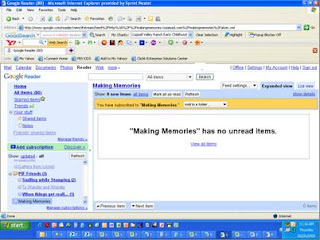
Depending on the blog you may or may not have unread items. If you do, then they’ll appear in the screen where it says “Making Memories” has no unread items.” If you want to view all of the blog entries you can click on View All Items. You’ve just added your first blog! How easy was that? Just do it as many times as you have blogs.

Now you can also organize your blogs as well by putting them in folders. If you see in the golden color bar where it says “You have subscribed to “Making Memories.” There is a button that says Add to a folder…. You can add it to an existing folder (if you have one), create a new one or leave as is. I like to organize mine on topic. I have photography/Photo Shop tutorial blogs, Scrapbook, Stamping, Friends, and even company blogs (like Making Memories). I even have a folder for new blogs I found and entered blog candy (so I remember to check back to see if I won!) This makes it much easier for me to locate a blog I want. It also allows me to not have to read ALL my blogs at one time if I don’t want to. I can choose a folder and only scroll through those. If you forget when you add a blog to put it in a folder (or you want to create one later, just click on the Feed Settings tab and go down to the third section where you folders are listed or choose at the bottom New Folder.

A couple notes. When you scroll through a blog, it now marks it as read and when you refresh your reader, it’s gone. SO, if you find something of value, you’ll need to figure a way to remember it. If you want to visit the blog (i.e. to leave comments or blog candy), you can click on the name of the blog entry in your reader window or on the name of the blog at the top and it’ll take you directly to the blog.

I’ve only scratched the tip of Google Reader and I know there must be more tips out there so how ‘bout YOU all give me some? What features could I be using? Also, was this helpful for you?

signature

Tuesday, June 24, 2008

MY blog Candy Time!

Woo Hoo! I've surpassed 1K in hits! THANK YOU! In show of my appreciation, I have the following candy up for grabs:
  • Ranger Glossy Accents
  • Jo-Ann Pink Letters
  • Heidi Swapp Distresser
  • American Craft Pink Polka dot ribbon
  • Five Heavy Weight 4x4 Coasters
  • Two Bind it all 4x4 acrylic pages (for your coasters above)
  • and a Copic Sketch C1 Cool Grey marker!
(I choose this color Copic marker because it is FABULOUS for shadows and I thought if you haven't tried Copics then it would be a good introduction to get you hooked!)


Of course there has to be rules and ways to enter. Here is the fine print:
1. One comment, one entry
2. Add my blog to your Google Reader (or similar) and get a second entry
3. Add a link to my blog candy on your blog and get a third entry!

Blog Candy Closes Sunday 6/29/2008 at 9PM CST.

Please use the following form for your entries. Upon reading on Freebies4Mom's website about Blog Coach's advice, I've decided to use GoogleDocs for my entries. This is going to be a better way to track entries (and safer too!)

Good Luck!


signature

Another Blogger giving Candy Away!

Did you see this blog and the candy she's giving away?? Magnolias?? Paper? Ribbon?? YUM! Go check her blog out too! She has some adorable creations!

signature